Build private browser video call rooms on WordPress

Build private browser video call rooms on WordPress

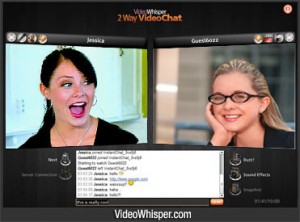
Use 2Way Videochat when users need to create a room and share an invitation for a private call. VideoWhisper’s WordPress plugin also supports random video chat if your community needs it.

Test an invitation-only call

  1. Install the 2Way VideoCalls plugin on HTTPS WordPress and check the available WebRTC signaling and STUN/TURN setup.
  2. Create an invitation-only room with two test accounts. Verify that the invited guest can join and that other visitors cannot.
  3. Try mobile and desktop calls from different networks. Review permissions, audio quality, connection recovery and link sharing.

Use WebRTC Host for compatible streaming or signaling options. For per-minute charges, provider profiles and paid groups, use PaidVideoChat.

Try 2Way Videochat · Get the WordPress plugin · Compare WebRTC Host options

Explore site recipes · Compare plans and services · Get a free consultation

Build a social live streaming community on WordPress

Build a social live streaming community on WordPress

Justin.tv was an early example of user-run live channels. For a current WordPress community with a similar broadcasting model, start with Broadcast Live Video and define how members discover and follow your channels.

Start with a small community

  1. Decide which members can create channels and who can view them. Keep a simple directory and clear reporting rules.
  2. Test browser or OBS broadcasting and decide which events need a streaming relay. Try playback and chat on mobile with a member and a guest.
  3. Add separate pages for schedules, channel categories or archived broadcasts as your community grows.

If you also want private coaching or paid creator calls, integrate PaidVideoChat. For a public broadcast-first setup, size the relay for audience concurrency.

Try the live channels demo · Compare live plans · Explore paid private calls

Explore site recipes · Compare plans and services · Get a free consultation

TinyChat Alternative

Build community video rooms like Tinychat

Tinychat is a familiar reference for topic-based video rooms. VideoWhisper offers separate tools for invitation-only calls, group video collaboration and streams with audience chat.

Choose the right room type

  1. For an invite-only conversation, start with 2Way Videochat, restrict room access and send the room link to your test user.
  2. For group collaboration or scheduled premium sessions, review PaidVideoChat conferencing modes, speaker roles and billing options.
  3. For audience-focused rooms, use Broadcast Live Video and test the broadcaster, viewer, chat and moderation experience.

Check camera and microphone permissions, room access, and the maximum number of simultaneous speakers and viewers for your configuration.

Try 2Way Videochat · Try PaidVideoChat conference demos · Try live channels

Explore site recipes · Compare plans and services · Get a free consultation