Build an adult video-on-demand site with Video Share VOD

Adult video sites such as Pornhub, XVideos and RedTube illustrate a user-uploaded video catalog model. Video Share VOD supplies WordPress upload, processing, publishing and playback tools for a catalog you operate.

Plan hosting, access and publication

  1. Confirm that your hosting and payment providers allow the intended content and regions. Define content rights, performer verification, age checks where required, reporting and takedown procedures before accepting uploads.
  2. Test a small collection you have rights to publish. Configure FFmpeg encoding, thumbnails and playback on mobile and desktop.
  3. Decide whether to use free playback, per-title purchases or memberships. Verify anonymous access and the delivery configuration for restricted files before accepting payment.

The $20/month Dev VOD tier is for testing and currently lists 10 GB storage and 100 GB monthly transfer. The $50 Beta tier lists 200 GB, subscriptions and user channels. For live cameras or paid calls, evaluate a live streaming plan separately.

Try the VOD demo · Compare VOD plan limits · Compare live plans

Explore site recipes · Compare plans and services · Get a free consultation
Popular for:

Collect reaction videos and browser recordings in WordPress

The current Media Capture plugin records supported camera, microphone and screen sources directly in the browser. It suits video interviews, assignments, creator submissions and reaction-video projects.

Build the capture workflow

  1. Choose the recording mode and intended contributors. Use HTTPS and ask people to grant only the browser permissions the recording uses.
  2. Test preview, record, review and upload on your target devices. Check file size, upload limits and the destination for accepted recordings.
  3. Save accepted captures to WordPress or use the Video Share VOD integration to process and publish video. Keep submissions in review until they are ready.

If a reaction must track the exact playback position of a source video, test that integration separately. Media Capture provides recording and integration hooks, and source playback synchronization depends on your implementation.

Try VideoWhisper recording demos · Read Media Capture documentation · Explore Video Share VOD

Explore site recipes · Compare plans and services · Get a free consultation

Popular for:

Build private browser video call rooms on WordPress

Build private browser video call rooms on WordPress

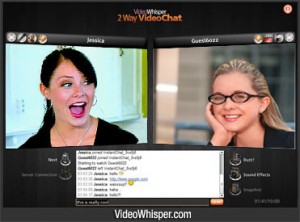
Use 2Way Videochat when users need to create a room and share an invitation for a private call. VideoWhisper’s WordPress plugin also supports random video chat if your community needs it.

Test an invitation-only call

  1. Install the 2Way VideoCalls plugin on HTTPS WordPress and check the available WebRTC signaling and STUN/TURN setup.
  2. Create an invitation-only room with two test accounts. Verify that the invited guest can join and that other visitors cannot.
  3. Try mobile and desktop calls from different networks. Review permissions, audio quality, connection recovery and link sharing.

Use WebRTC Host for compatible streaming or signaling options. For per-minute charges, provider profiles and paid groups, use PaidVideoChat.

Try 2Way Videochat · Get the WordPress plugin · Compare WebRTC Host options

Explore site recipes · Compare plans and services · Get a free consultation

Popular for: